Connect 8Raise to your AI assistant.
Then find investors just by asking. Pick your app below. It takes about a minute.
New to 8Raise? Create an account. You start with 10 free credits, no credit card.
Connect 8Raise to Claude in one click.
The button opens Claude with 8Raise already filled in. You only click Add.
- 01Click Add in Claude
- 02Sign in to 8Raise and click Allow
- 03Start a new chat and say hi
If the button does not open the form, add 8Raise by hand:
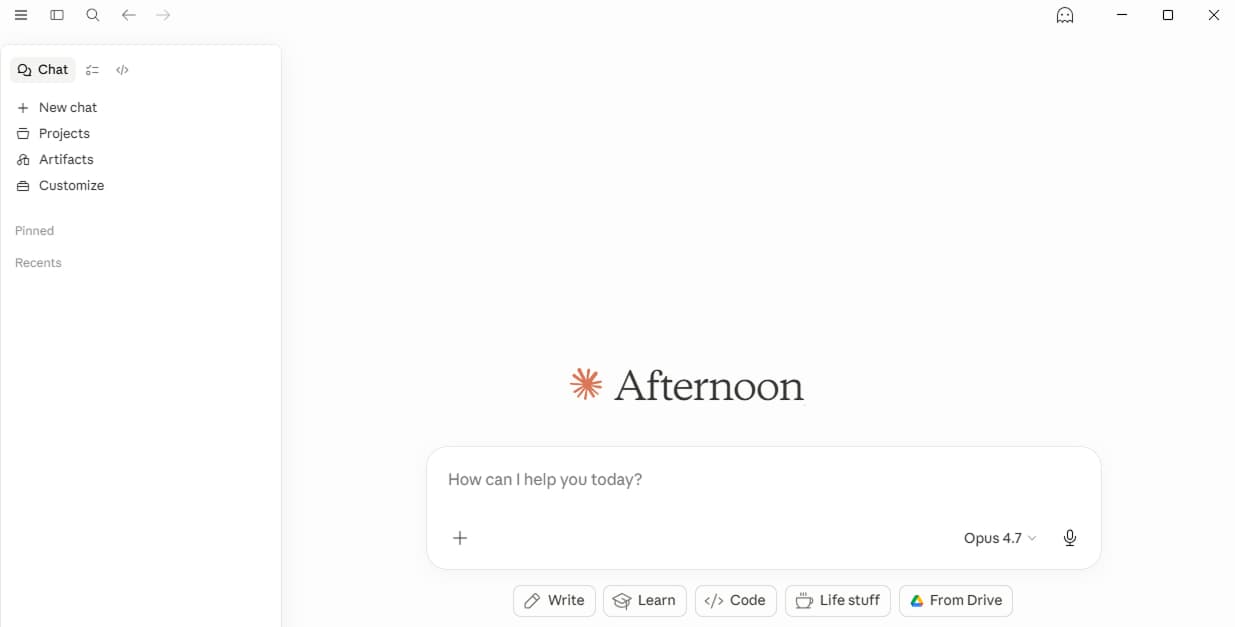
Open Claude.ai, then Customize
Sign in to claude.ai. In the left sidebar near the top, click Customize.
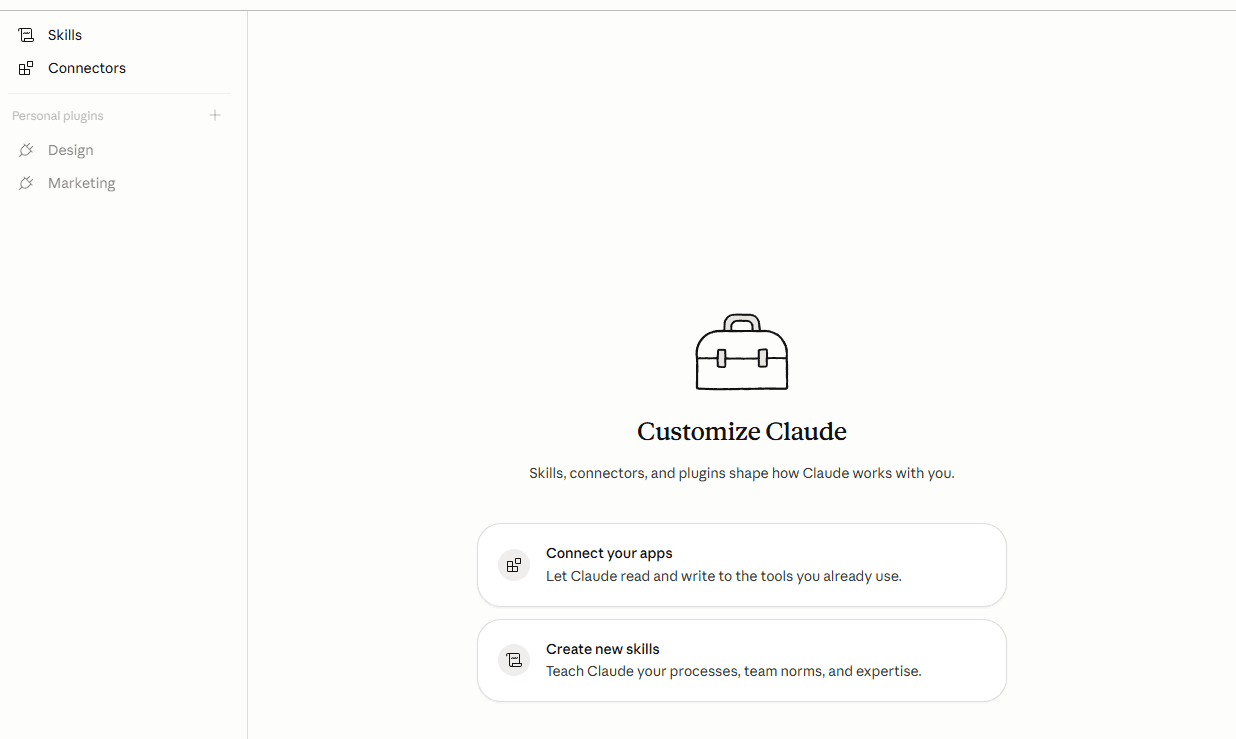
Open the Connectors panel
On the Customize page, click Connectors in the left sub-nav (or the “Connect your apps” card).
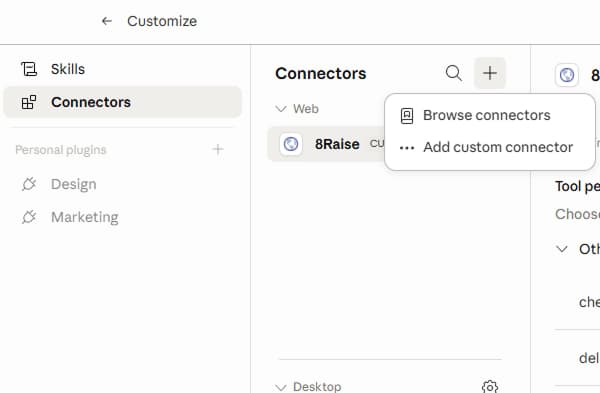
Click +, then 'Add custom connector'
In the Connectors panel, click the + button at the top right (marked 1). A small popover opens. Click Add custom connector (marked 2).
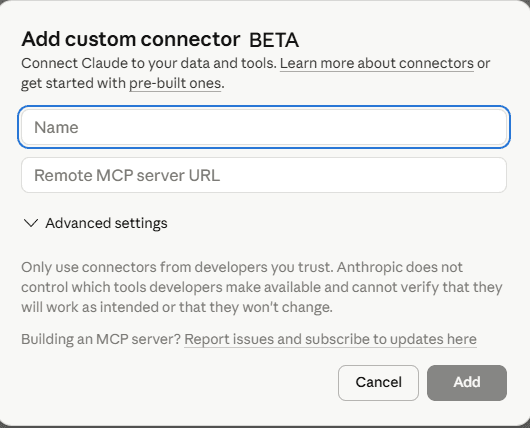
Paste the name and URL, click Add
Type 8Raise in Name and paste https://mcp.8raise.com/mcp in Remote MCP server URL. Leave Advanced settings as they are. Click Add. Claude opens an 8Raise sign-in window. Sign in (or sign up), click Allow, and you are done.
Add 8Raise to ChatGPT.
It takes about a minute. In ChatGPT, open Settings, then Apps, then Advanced settings. Turn on Developer mode and click Create app. Paste the name and URL below.
ChatGPT needs Developer mode to add your own app. It is on Pro, Plus, Business, Enterprise and Edu, and on Free accounts since April 2026.
- 01Paste the name and URL, click Create
- 02Sign in to 8Raise and click Allow
- 03Start a new chat and say hi
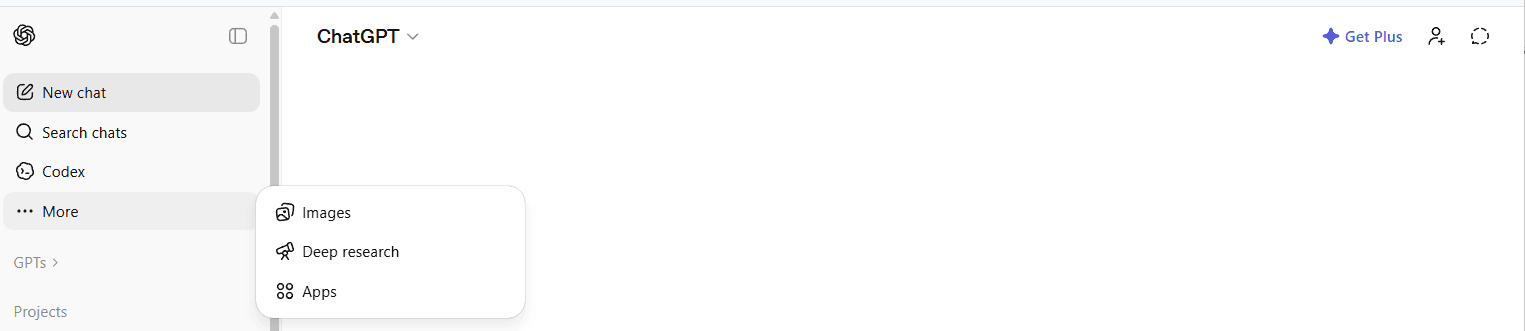
Find Apps in your ChatGPT sidebar
Sign in to chatgpt.com. In the left sidebar, click More, then choose Apps from the popup.
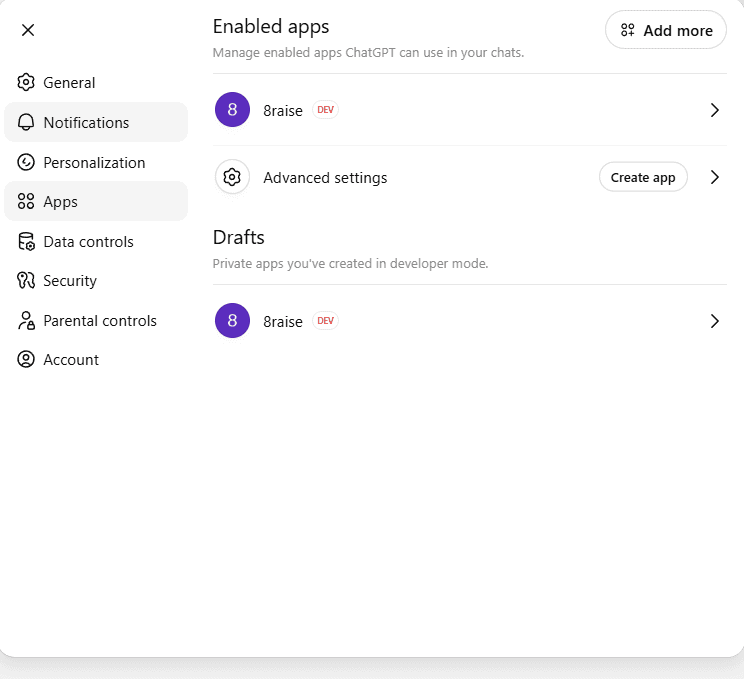
Open Advanced settings
On the Apps page (Settings, Apps), click Advanced settings. That opens the Developer mode panel in step 3.
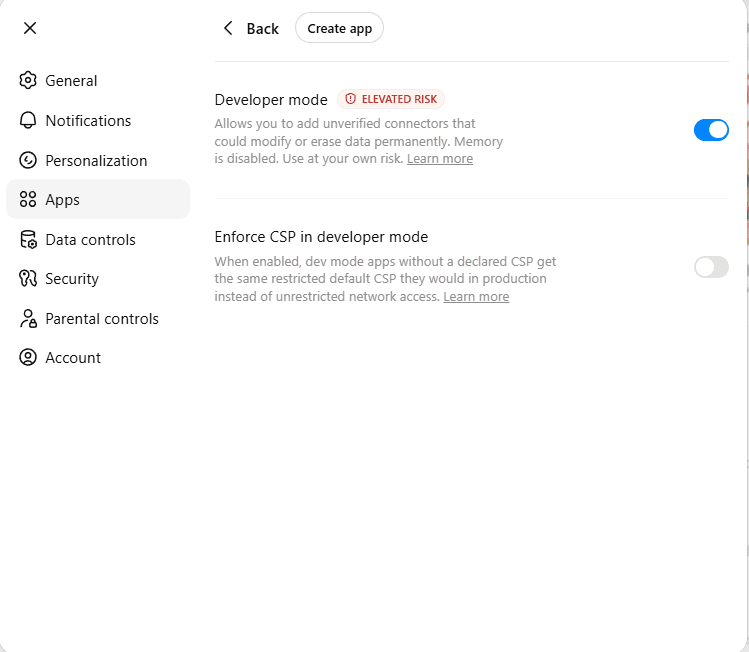
Turn on Developer mode, then click Create app
Flip the Developer mode switch on (marked 1). ChatGPT warns you it is elevated risk. That is expected: you are adding a server you trust. Leave “Enforce CSP” as it is. Then click Create app at the top of the page (marked 2).
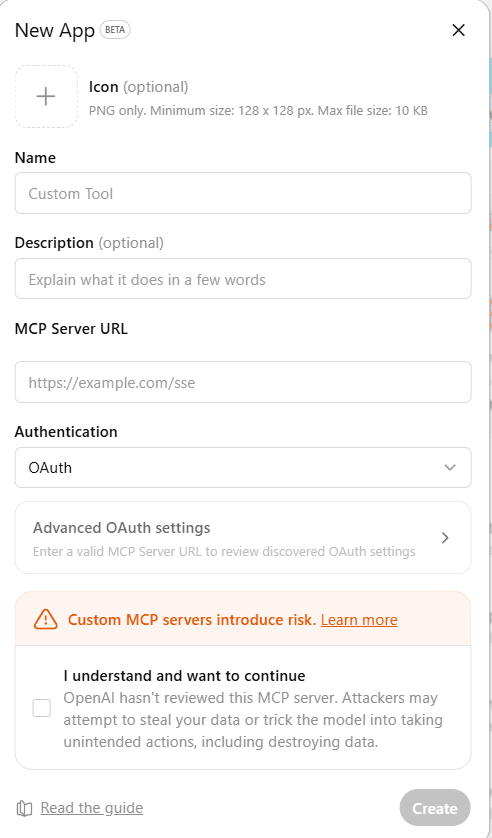
Paste the name and URL, tick the box, click Create
Type 8Raise in Name and paste https://mcp.8raise.com/mcp in MCP Server URL. Leave Authentication as OAuth. Tick I understand and want to continue, then click Create. ChatGPT opens an 8Raise sign-in window. Sign in (or sign up), click Allow, and the connector lights up.
CSV exports come back as a download link, not an inline table. Long searches run in the background: ChatGPT says “running” and checks back every 30 seconds. Same data as in Claude.
Let Claude Code set it up for you.
Copy this, paste it into Claude Code and press Enter. It adds 8Raise and tells you when to sign in.
Set up 8Raise for me so I can find investors from here.
1. Run this command: claude mcp add --transport http --scope user 8raise https://mcp.8raise.com/mcp
2. Tell me to type /mcp, pick 8raise and choose Authenticate. A browser window opens where I sign in to 8Raise and click Allow. If 8raise is not in the list, tell me to restart Claude Code first.
3. When I say it is done, say hi to 8Raise and show me my plan and credits.
Rather type it yourself? Run this in your terminal. Then type /mcp in Claude Code, pick 8raise and sign in.
Or use an API key
For when you would rather not sign in through the browser. Swap 8r_your_key_here for your key. Sign in, then open Dashboard > Settings > API key.
claude mcp add --transport http --scope user 8raise https://mcp.8raise.com/mcp --header "Authorization: Bearer 8r_your_key_here"
Then run /mcp in Claude Code. You should see 8raise with about 28 tools.
Add 8Raise to Perplexity.
It takes about a minute. In Perplexity, open Customize, then Connectors, then + Custom connector. Pick Remote, paste the name and URL below, and set Authentication to OAuth.
Custom connectors need a Pro, Max or Enterprise Perplexity account. On Enterprise, an admin may need to turn them on first (Enterprise settings, Permissions, Connectors).
- 01Paste the name and URL, click Add
- 02Sign in to 8Raise and click Allow
- 03Start a new chat and say hi
Open Perplexity, then Customize
Sign in to perplexity.ai. In the left sidebar, click Customize to open its sub-menu.
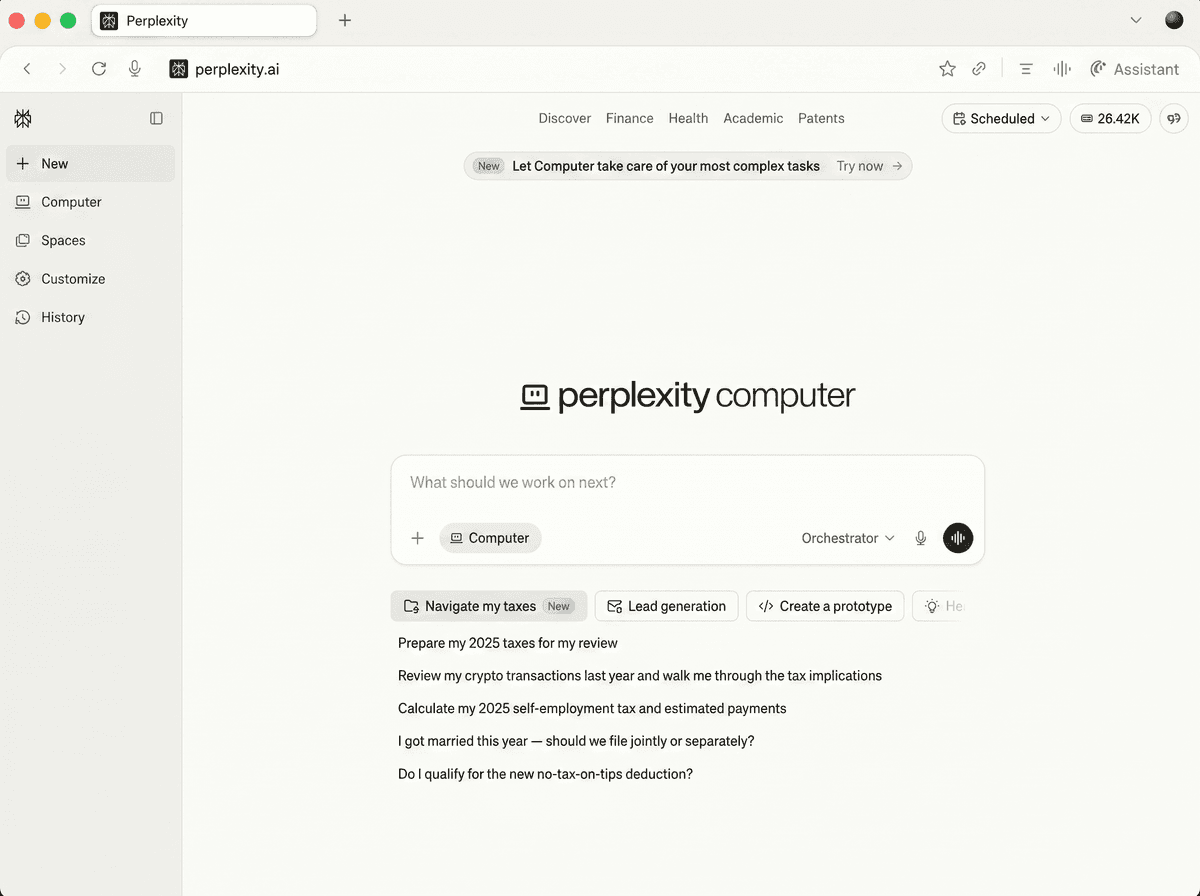
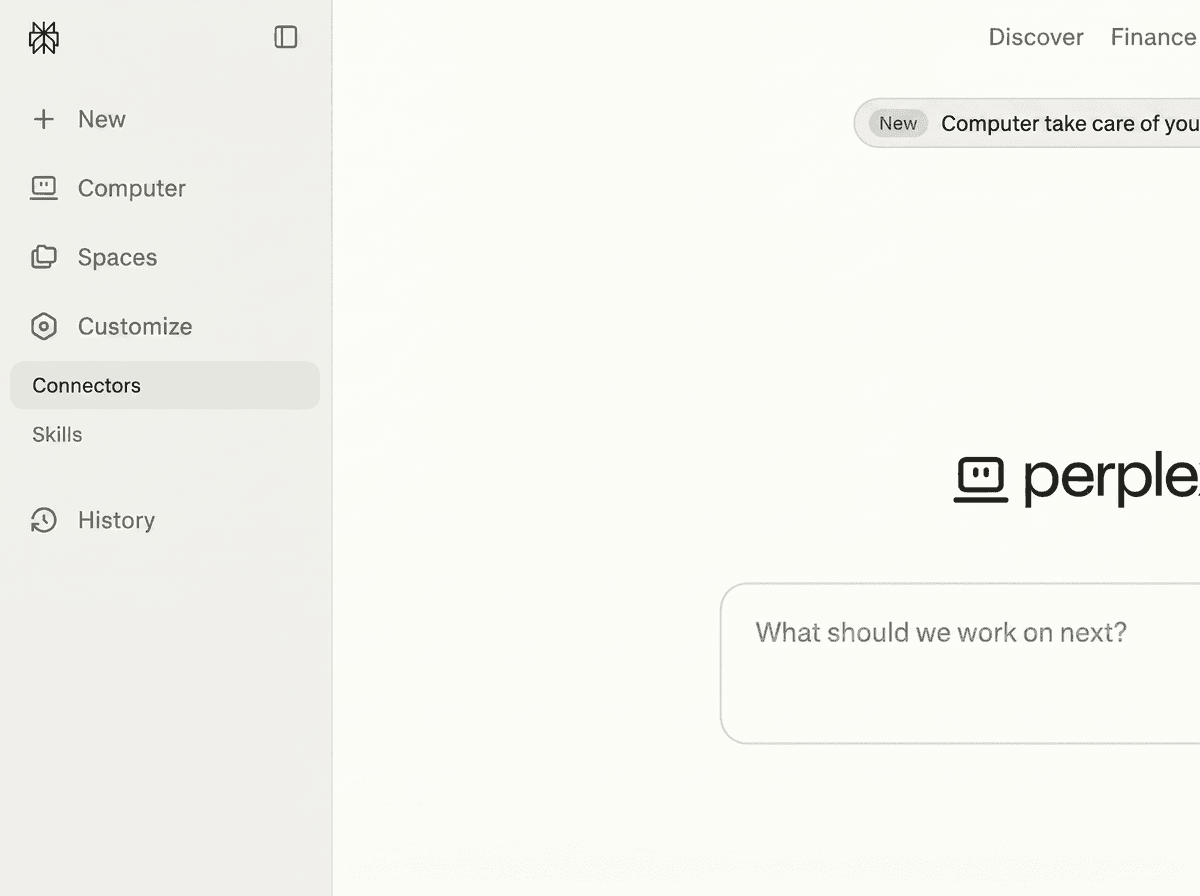
Click Connectors
A sub-menu appears under Customize. Click Connectors.
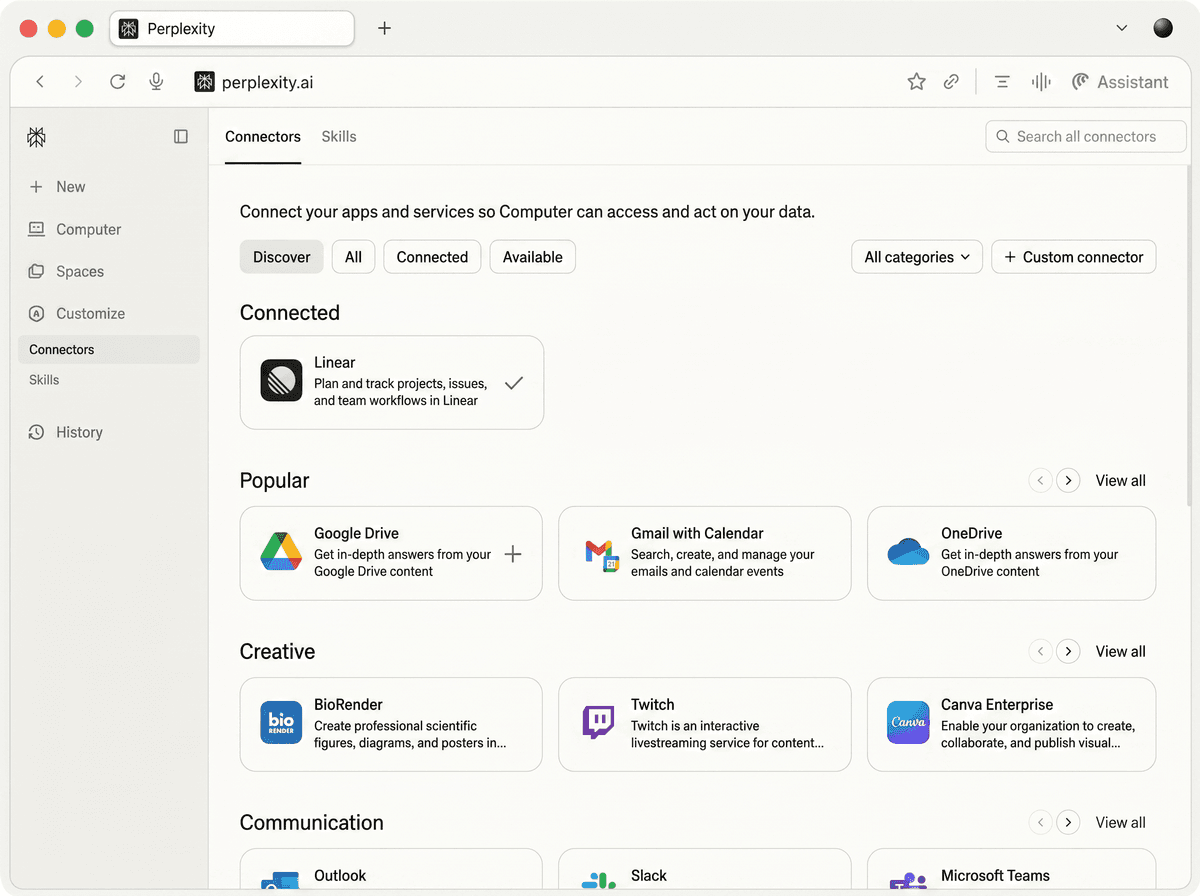
Click + Custom connector
On the Connectors page, click + Custom connector in the top right corner.
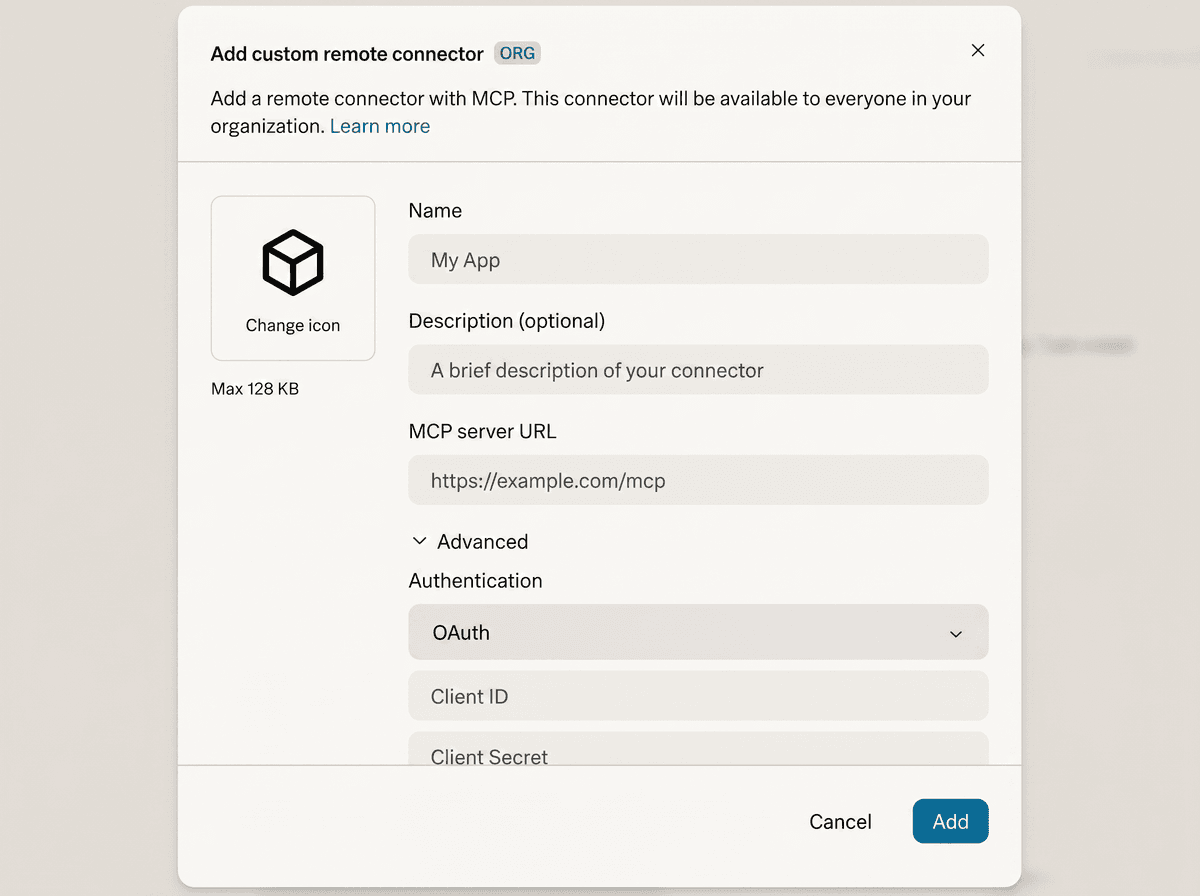
Pick Remote, paste the name and URL, click Add
In the form, pick Remote at the top. Type 8Raise in Name and paste https://mcp.8raise.com/mcp in MCP server URL. Open Advanced and set Authentication to OAuth. Leave Client ID and Secret blank: Perplexity fills them in for you. Tick the box, then click Add. Sign in to 8Raise, click Allow, and the connector shows up in your list.
The 8Raise tools work in Perplexity chat and in Perplexity Computer. Long searches run in the background: Perplexity says “running” and checks back as results land.
Use 8Raise in any app that supports MCP.
Paste the URL into your app's MCP or connector settings. It works with any app that supports remote MCP servers over HTTP.
No key to copy
Your app finds our sign-in page by itself. You sign in to 8Raise and click Allow. We use OAuth 2.1 with PKCE and dynamic client registration, so there is no client ID or secret to paste.
For apps that use a config file
Send your key as a Bearer token. Sign in, then open Dashboard > Settings > API key.
{
  "mcpServers": {
    "8raise": {
      "url": "https://mcp.8raise.com/mcp",
      "headers": {
        "Authorization": "Bearer 8r_your_key_here"
      }
    }
  }
}Example only. The exact format depends on your app.
Try it in Claude.
Each one opens a new Claude chat with the ask typed in. If 8Raise is not connected yet, Claude asks you to connect it first. Nothing runs until you say go.
Say hi to get started.
Start a new chat and type one of these. 8Raise shows your plan and credits, then asks who you want to reach.
Then describe who you want to reach in plain English. 8Raise picks the right mode (VC, Real Estate, LP or RIA), asks any missing questions, shows you a preview, and runs the search only after you say go. Lookalike, Firm Finder and enrich a list work from chat too.
See a sample chat
Most of 8Raise works from chat. A few things live only in the 8Raise Agent on your dashboard.
From Claude, ChatGPT or Perplexity
- Search for investors
- Run Lookalike and Firm Finder
- Enrich a list
- Export
- Send leads to HeyReach
Upload it and we'll find the people.
For when you already know which firms you want to reach. Uses the same monthly credits as search, charged by tier. Lives in the dashboard under Enrich a list.
- 01Paste or upload
Comma-separated list of firms in a textbox, or drag-drop a CSV / Excel. Just one column needed: "company".
- 02Configure
Pick investors per firm (1-5) and contact channels (LinkedIn / email / phone). Preview your plan balance. Hit run.
- 03Same dashboard
Results land in the same table as regular searches. Save, export, push to HeyReach. Includes firm context (AUM, stages, portfolio) on every row.
Charged by the tier you pick, before delivery. 50 firms x 3 per firm = up to 150 credits at tier 1, or up to 300 at tier 2. Up to 1,000 firms per run on the dashboard. From Claude or ChatGPT it is up to 200 firms per job. Add the firms' country (one country per list) so we skip same-name firms elsewhere. A list that spans several countries is best split into one list per country. Active-role verification skips alumni.
If something doesn't work.
Claude, ChatGPT, or Perplexity says it can't find the tools.
Double-check the URL. It must be exactly https://mcp.8raise.com/mcp (not https://mcp.8raise.com). If you use an API key in Claude Code or a config file, the Authorization header must start with 'Bearer 8r_'. Copy the key from Dashboard > Settings > API key after signing in.
ChatGPT says I can't add a custom MCP server.
Make sure Developer mode is ON: Settings, Apps, Advanced settings, turn on Developer mode. Without it, ChatGPT only allows pre-vetted apps. Then go back to Apps, click Create app, and the MCP Server URL field appears.
Every tool call errors, even get_started or get_billing_info.
First, start a new chat and try again. After an update the connector reconnects by itself, and a new chat is usually all it needs. If it still fails, the sign-in is stuck. Sign in, open MCP in your dashboard menu, click Disconnect on that app, and add the connector again. A fresh sign-in takes about 20 seconds.
I just made a change and Claude / ChatGPT / Perplexity isn't seeing new tools.
All three apps keep the tool list per chat. Start a new chat and the updated tools appear. In ChatGPT and Perplexity you can also click Refresh on the connector's settings page.
Perplexity doesn't show the Custom connector option.
Custom connectors need Pro, Max or Enterprise on Perplexity. The free tier doesn't have them. On Enterprise, an admin may also need to turn them on first in Enterprise settings, Permissions, Connectors. Then the option appears under Customize, Connectors, + Custom connector.
Claude Code does not show 8raise in /mcp.
Restart Claude Code, then type /mcp again. If you added it with --scope user it shows in every folder; without it, only in the folder where you ran the command. Run 'claude mcp list' in your terminal to check it is there.
Searches fail with 'limit reached'.
You've used your plan's monthly credits. The assistant tells you how many you used and how many are left. Change plan in Dashboard > Plans; the connector gives you the link.
I added a new saved-lead tag or exclusion but the next search didn't pick it up.
Exclusion lists are cached for 60 seconds. Wait a minute and try again. Active exclusion lists are announced before each search so you can see what's applied.
The connector works in Claude Desktop but not claude.ai (or the other way round).
Start a new chat and try again first. If that fails: Sign in, open MCP in your dashboard menu, click Disconnect on that app, and add the connector again. The new sign-in lasts until you disconnect it.
CSV export looks different in ChatGPT vs Claude.
Expected. Claude.ai shows the CSV inline as a table. ChatGPT gives you the same data as a download link. The data is identical, and Pro plans get watermark-free exports on both.
Ready to find your investors?
Start with 10 free credits, no credit card. Plans from $59/mo, cancel anytime. Connect 8Raise to your assistant and run your first search in under two minutes.
Start free