🛠️ 4 fundraising hires, one 10-minute setup.
A fundraising team is four jobs: find the firms, read the mandates, verify the contacts, queue the outreach. Here is what each role does all day, and the exact clicks that make 8raise run all four from one described raise. Minute by minute.
By Nicolas Keller and Ignacio Prieto · Published 30 July 2026
A fundraising team is really four jobs: someone to find the firms, someone to read the mandates, someone to verify the contacts, someone to queue the outreach. Almost nobody hires four people for it, so one person does all four badly, at 11pm. This guide shows what each role does all day, then the exact clicks that make 8raise run all four from one described raise. That is AI fundraising in practice: the four jobs done by software, with you making the calls. Ten minutes, start to finish.
The four hires AI fundraising replaces
- The researcher finds the firms. You say "seed fintech investors in London" or "US funds of funds that back first-time managers", and they turn a fuzzy target into a named universe.
- The analyst reads the mandates. Firm type, stage, sectors, where the fund actually invests. This is the read that tells you whether a name is worth an email before you send it.
- The list builder verifies the contacts. A firm is not reachable, a person is. This role turns firm names into the right seat, with a working email and a live LinkedIn profile.
- The coordinator queues the outreach. Sequences, follow-ups, and the record of who was already contacted so nobody gets hit twice.
Four salaries, four handoffs, and days between "we should be talking to European seed funds" and the first message going out. Here is the ten-minute version, minute by minute.
Minutes 0 to 2 , describe the raise once
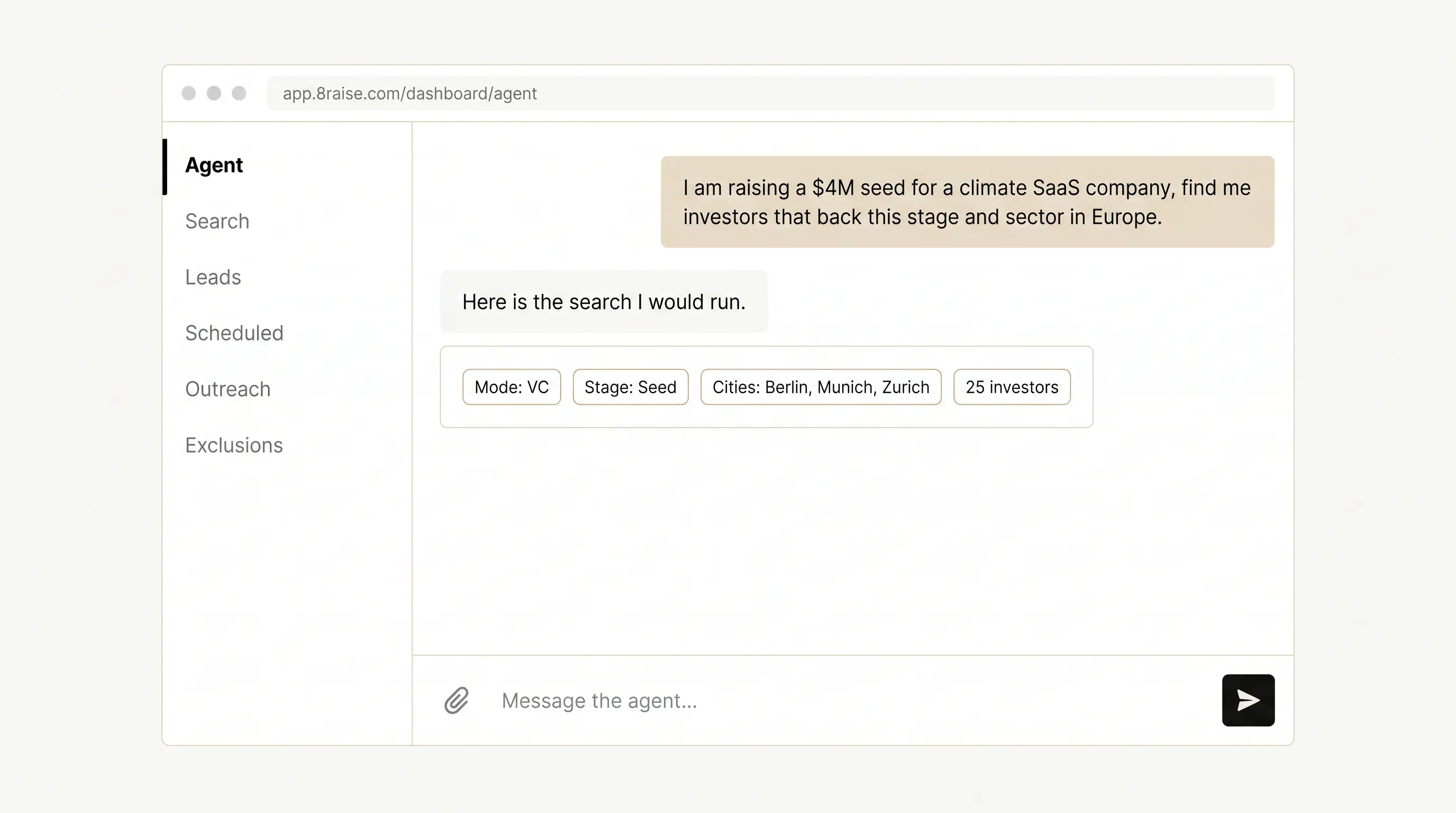
Open 8raise and say what you are raising in plain words, either in the agent chat or on the search form. For example: "I am raising a $4M seed for a climate SaaS company, find me investors that back this stage and sector in Europe."
8raise routes it to the right mode for you: VC for a startup round, LP for a fund manager raising from allocators, Real Estate for sponsors, RIA for wealth managers, and the Advanced tier when your ask is precise enough to need fund size, vintage and deal stage. You describe, it routes. That is the researcher's job, finished the moment you finish the sentence.
No ideal investor profile yet? Hand over your deck instead
If you cannot describe your ideal investor, do not guess at filters. In the agent chat you can upload your deck or docs, or paste your website, and it reads them to work out who should back you. Loading that context is free, it does not spend credits, and it sticks: a new chat next week still knows your company.
Describe your raise to the agent
Two rules that decide whether the search returns anyone
- Name cities, not continents. "Europe" sweeps a whole continent. "Europe, plus Berlin, Munich and Zurich" is a far better search, and you can add as many cities, countries or US states as you want.
- One theme per search. Two or more themes belong in separate runs, or in Advanced with a sector vertical. Cramming "AI, fintech, climate" into one keyword box is the single most common way to get an empty result.
Minutes 2 to 3 , check the price before anything runs
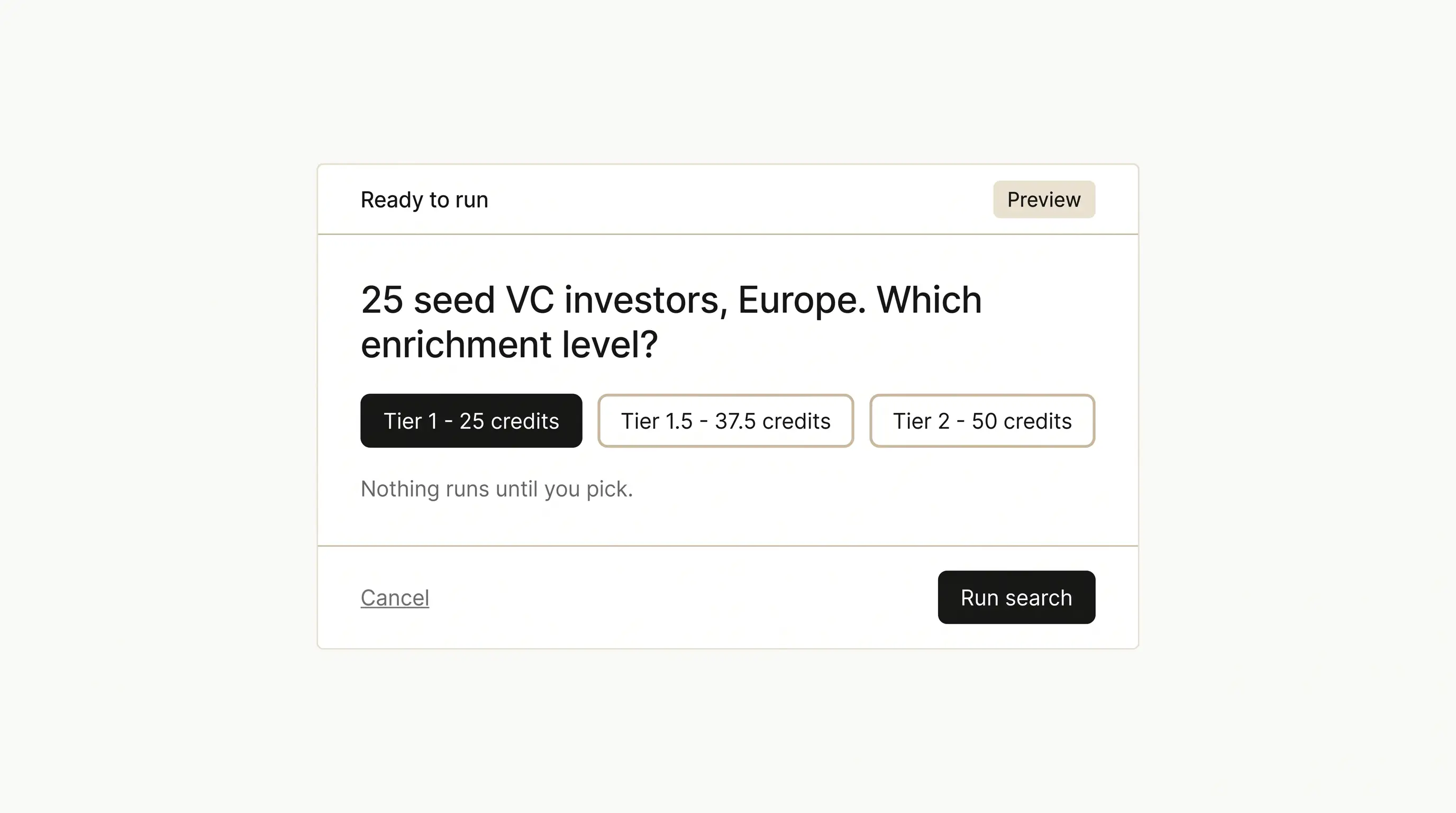
Before a single credit moves, 8raise shows you exactly what the run will cost and waits. Nothing happens until you confirm. Change the lead count, tighten the geography, swap the focus, and watch the number update.
You also pick the depth here, and it is never chosen for you:
- Tier 1 , the verified contact itself, 1 credit per investor.
- Tier 1.5 , adds AI investor research.
- Tier 2 , adds investor and firm research, so you get the thesis and an opening angle.
Use Tier 1 when you are building volume and writing your own angle. Use the research tiers for the short list of firms you really want to land.
Minutes 3 to 6 , read the results like an analyst
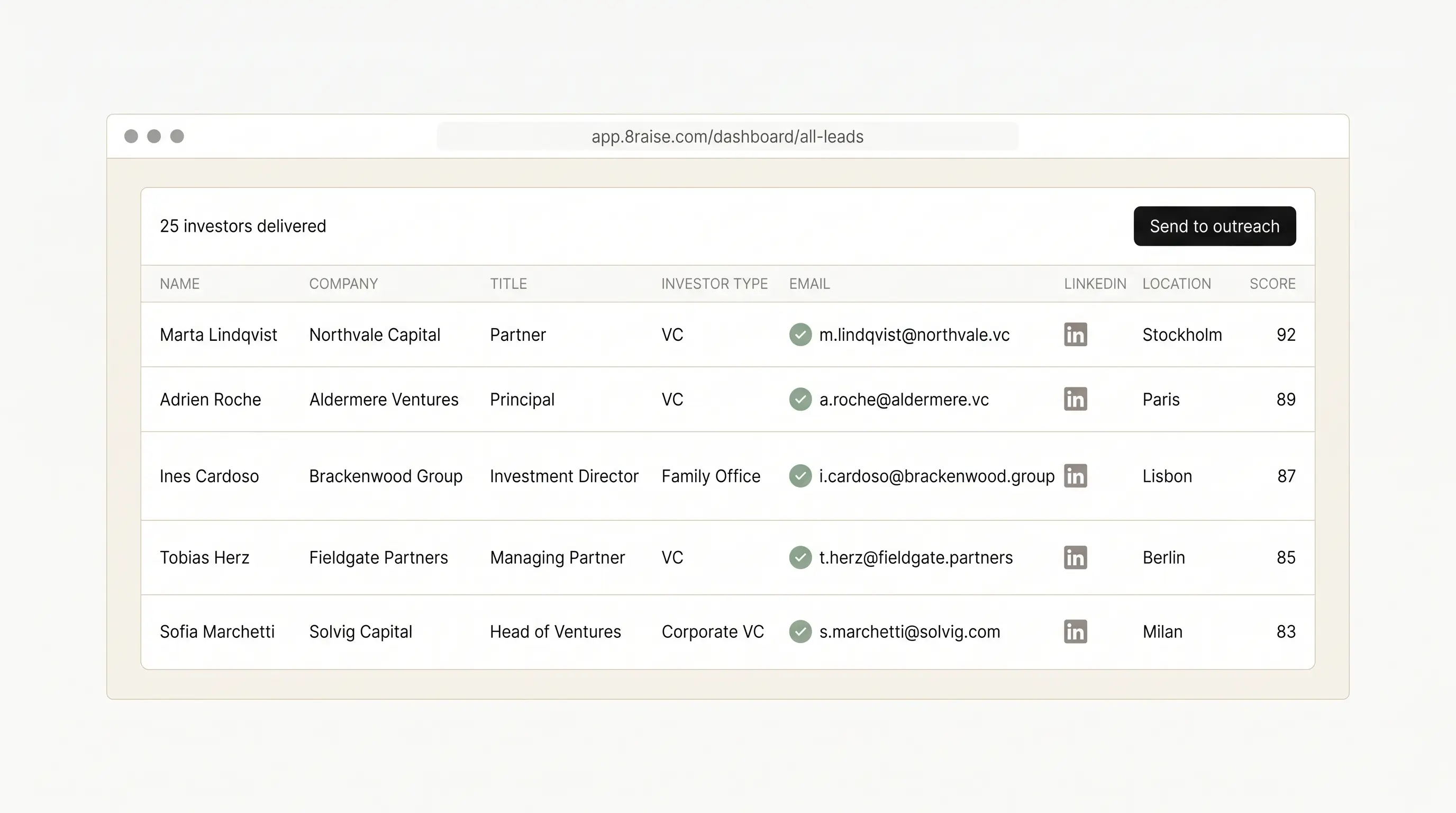
Every delivered investor arrives with the read already attached: firm, title, investor type, location, and the mandate signals the analyst would have spent an afternoon assembling. Sort by fit, cut what does not match, keep the list you would actually send to.
Two things happen automatically underneath. A final pass drops anyone whose title is clearly not an investor role, so a family-office receptionist never lands in your list. And if a search comes back thin against what you asked for, 8raise keeps researching in the background and tops it up rather than handing you three rows and calling it done.
Minutes 6 to 8 , the contacts are already verified
This is the list builder's entire job, and it is done before you open the table. Each row carries a real work email and a live LinkedIn profile. Where a channel cannot be confirmed, 8raise escalates to a better source, and if it still cannot confirm one it leaves the cell empty rather than guessing. A guessed address bounces, bounces burn your sending domain, and a burned domain kills the whole campaign.
On enrich-a-list you can go further and pick which channels you need at all, so only contacts with a LinkedIn, an email or a phone are delivered and you never pay for a row you cannot use.
Minutes 8 to 9 , push it to outreach
Send the investors you kept straight into your LinkedIn and email sequences. No export, no re-import, no CSV round-trip. 8raise can also draft the connection note and the follow-up sequence, personalised per contact, and build the campaign as a draft so you review it before a single message goes out.
The 30 seconds that stop you paying twice
Upload your CRM export, or anyone you have already emailed, as an exclusion list. Block firms by name too, your existing investors or anyone you never want to see again. Active lists apply to every search in every mode from then on, and you are told which ones are being applied before each run. This is the piece a coordinator would otherwise maintain by hand, forever.
Minute 9 to 10 , put the whole team on a schedule
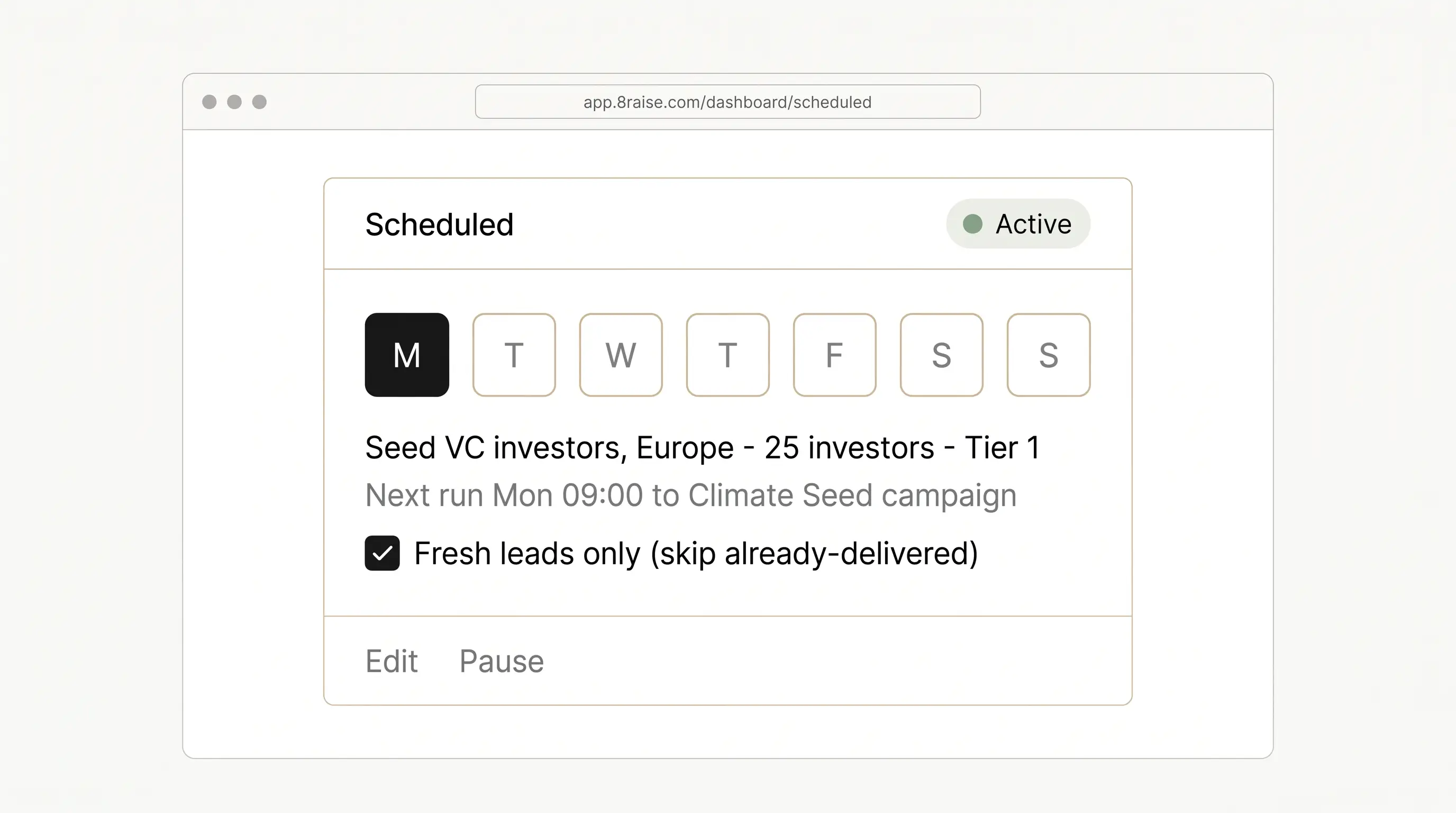
A raise is not one search. Set it to re-run daily, on a chosen weekday, or on a day of the month, at an hour you pick. Keep "fresh leads only" on and every run returns investors it has never delivered you before, and can flow straight into the campaign you just built.
That is the difference between a tool you remember to open and a team that works while you are pitching.
If you already have the firm names
Skip the researcher entirely. Take the firm names you already have , your pipeline, a competitor's backers, a list someone sent you , and paste them into enrich-a-list. 8raise finds the right decision-maker at each one with the same verified channels. Two contacts per firm if you want a second door to knock on six weeks later.
And if you cannot name a single target yet
Work backwards from companies like yours. Lookalike discovery maps comparable companies, finds the investors who backed them at your stage, and checks each one is still writing cheques. The comparable map is free, so you can sanity-check the direction before you spend anything, and you approve the firms before any credits move.
What this team costs to run
Everything above comes out of one pool of credits, where 1 credit is 1 delivered investor at Tier 1. You start with 10 credits free, no card required. Paid plans run from Solo at $59 a month for 150 investors to Pro at $1,059 for 3,000, with Starter and Growth in between, and teammates are $20 a seat sharing the same pool.
One thing worth knowing: every plan has every feature. The agent, all search modes, lookalike, enrich-a-list, verified email, LinkedIn and phone, exclusions, scheduling and exports are on the cheapest plan exactly as they are on the most expensive. Plans differ only in how many investors you get each month.
That is the whole setup
One described raise, and the four roles run from it: the firms found, the mandates read, the contacts verified, the outreach queued, then repeated on a schedule without being asked.
The short version, if you only remember one thing per minute: describe the raise instead of filling in filters, name cities rather than continents, read the price before you confirm, and put the search that worked on a schedule the same day you run it.
Save to your library.
Keep this guide in your 8raise Resources library, next to the investor lists you claim.
Already have an account? Log in and it goes to your library.
Related resources.
- GuideInvestor List: 25 Free Lists of Investors by Type and Region
- GuideHow to Start a Private Equity Firm: Strategy, Track Record, Terms and Your First LPs
- Investor list67 Venture Capital Funds of Funds: 201 Contacts at the LPs That Back VC Managers
- Investor list100 Investors in the Gulf Capital Ecosystem
- Investor list100 Swiss and Liechtenstein Family Office Investors
- Investor list100 VC Partners and Investors in Japan and Korea